
Last updated: April 3, 2024
Creating a successful Google ad campaign takes a lot of work. You need to strike a balance between the relevance of the keywords you use and the effectiveness of your ad copy, create high-performing landing pages, and develop a bidding strategy to ensure your ads appear at the top of the search results page.
Here is a list of tips to help you achieve that.
1. Use Google's targeting system
When you select audience segments, internet users are grouped into different categories based on their search behavior and interests.
Google's audience categories allow you to target by:
- areas of interest
- habits
- demographic data (family status, education, employment, etc.)
- purchase intentions and searches
- interactions with your company
This allows you to break down your campaigns into smaller groups to see if performance varies depending on the audience to which a visitor belongs. This will help you increase your conversion rates.
2. Target geographic areas that make sense
Whether you’re promoting an offer limited to a specific region or tailoring your advertising messages to local cultural nuances, geolocation enables personalization at a very granular level. This results in a better user experience and, consequently, more customer engagement.
The issue of language is also of particular importance. In fact, regional nuances within the same language—such as those between Flemish and Dutch—will require a meticulous selection of keywords for each market. We strongly recommend that you have your ads reviewed by local partners to ensure they align with local expectations.
3. Add ad extensions
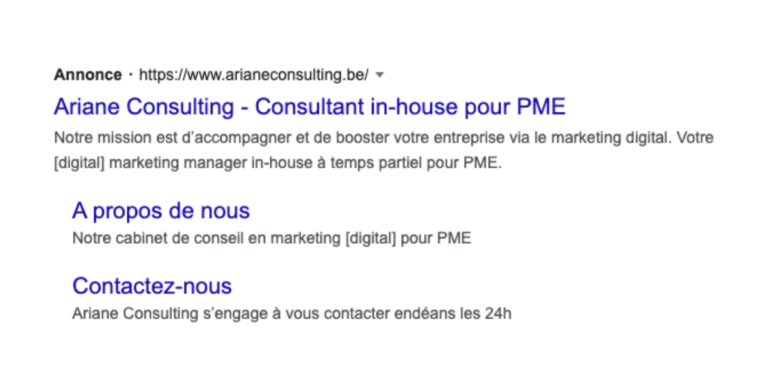
Extensions can completely transform the look of your ads. You can add additional information such as:
- links to pages on your website
- marketing taglines
- images of your products
- a phone number
- a form for prospective customers
- location information, including the address and hours of operation
- the price of your products
- a link to download your app
- a promotion or special offer
By using ad extensions, you can make your ad longer and take up more space on the search results page. Your ad will also be more relevant to users. All of this will help you get more clicks.
4. Pay close attention to the search terms used
On the “Overview” page, Google shows you the search terms for which your ads were displayed. Using this section is a great wayto identify keywords to exclude and find additional keywords to add to your campaigns.
This is also an opportunity to identify the keywords that should be set to exact match. If you only use broad-match keywords, some of your ads may appear in search results that have nothing to do with your business.
Track your keywords at least once a month.
5. Work on optimizing your ads and ensuring they align with your landing page
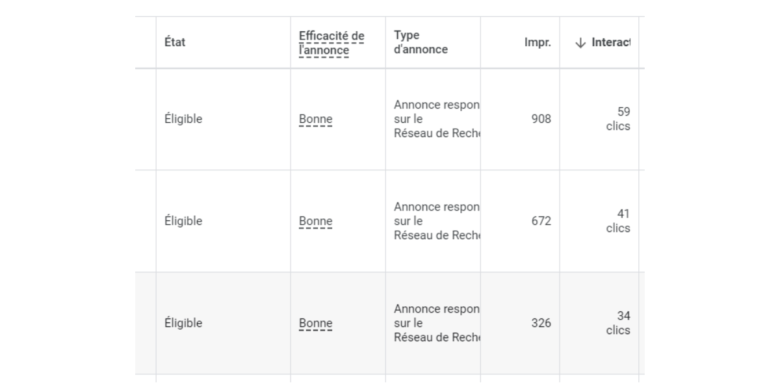
It’s essential to optimize your ads to achieve the highest possible “Ad Effectiveness” score. Start by including your keywords in the URL that will appear in your ad. Create several headlines that also include your keywords. Include your keywords in your descriptions. Your ads will then be shown more often and, most importantly, they’ll perform better.
Google evaluates the quality of your campaigns by analyzing the relevance of your ads, keywords, and landing pages. It is therefore important to ensure that your keywords are consistent across your ads and your landing page.
The higher your Quality Score, the lower your ad costs will be, and the better your ad's placement will be.
6. Check the quality of the landing page
Google analyzes and evaluates the user-friendliness of your page. It takes into account factors such as how well your page's content matches users' search terms, as well as how easy it is to navigate your page.
Optimizing your campaign doesn't stop with Google Ads. You also need to work on your landing page. Make sure it's optimized for SEO (search engine optimization), loads quickly, and is optimized for smartphones.
Next, evaluate your page's effectiveness by adding high-contrast call-to-action banners featuring large buttons. This will significantly increase your conversion rates.
7. Boost Prospect Interest with Retargeting
To maximize the return on investment of your Google Ads campaigns, you can’t let potential customers slip away after their first visit. Retargeting (or remarketing) allows you to target users who have already shown interest in your business but haven’t yet taken the time to contact you.
By personalizing and retargeting ads based on visitors' activity on your site, you significantly increase the chances of converting them.
Would you like to get started with Google Ads or improve your campaigns to boost your small business’s performance? Contact us. Our team is ready to help you.