
When our consultants begin a [digital] marketing project, they quickly turn their attention to the data provided by Google Search Console. However, it’s not uncommon to find that it hasn’t been set up or is rarely checked.
That’s why we’re going to walk you through everything from the very beginning when it comes to this very interesting Google tool. By the end of this blog post, you’ll understand what Google Search Console is, how it works, and how to make the most of the insights it provides.
What is Google Search Console?
This is a free tool offered by Google. It’s very intuitive and will give you an overview of your website’s activity and visibility. By analyzing various metrics, you’ll be able to optimize its performance.
How do I set up Google Search Console?
First and foremost, you need to make sure you have a Google account. Once you do, go tothe Google Search ConsoleURL.
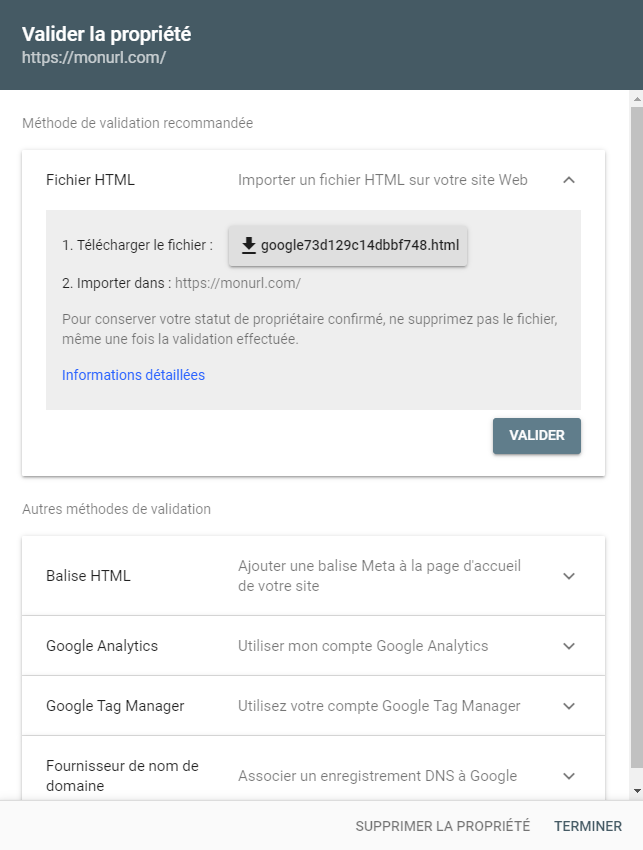
There are two ways to add an account to Google Search Console: using “Domain” mode or “URL prefix” mode. In general, URL prefix mode is a good choice because it makes it easier to verify ownership without having to go through DNS.
If you choose the "Prefix" mode, you'll receive an HTML file to import into the root directory of your website. This will allow Google to verify that you are the site owner and complete the process of creating your Google Search Console account.
Don't worry—with this information, your developer will know exactly what to do.
What are the key metrics to track in Google Search Console?
This tool provides a wealth of information. By default, you'll be taken to a page that displays an overview of your property. This page offers a selection of the information available through the tool.
Let's take a look at the key metrics you shouldn't miss. You can access them via the menu on the left side of the screen.
1/ Performance
Unless you take any action, the graphs displayed show the site's activity over the last three months.
In the top part of the screen, you can see:
- The total number of clicks to your site;
- The total number of impressions is the number of times Google has shown your website to users through its search engine;
- CTR (Click-Through Rate), or the average click-through rate;
- The average search engine ranking is the average position of your website in search results.
In the second half of the screen, other information is relevant:
- Search Queries: These are the keywords entered by users into the search engine that generate clicks and/or impressions. This information is useful for identifying the keywords for which your business ranks—or does not rank. Based on the number of clicks generated, this information will help you assess the quality of your meta descriptions. Are they effective enough to generate clicks?
- Pages: As with search queries, this tab allows you to track the performance of your pages in terms of clicks and impressions;
- Country: Country-specific information helps you understand the scope of your reach.
2/ URL Check
Here, you can check with Google tosee if a URL has been indexed. After copying and pasting the page's URL into the field provided, you'll find out whether your page has been indexed or not.
When a page is indexed, it means that after Google’s crawlers have visited it, your page becomes accessible through the search engine in response to a query entered by users.
If the page has not been indexed, you can find additional information on the page linked to the coverage report.
You can ask Google to index a page. This saves you time, since you don't have to wait for the crawlers to visit the site on their own. This is especially useful when you make changes to one of your site's pages.
3/ Links
This section provides information on the different types of links associated with your website, namely:
- Internal links: These are links you create between the pages on your site;
- External links: These are links from other websites that point to your website.
You can also view the main websites that link to you, as well as the keywords for which you are listed.
If you'd like to learn more about the features offered by Google Search Console, contact us by clicking the button ????